
Introduction
Fastload is the Teradata utility which can be used to load large amount of data in empty table on a Teradata System. The property which makes Fastload UNIQUE is its fast speed to load huge amount of data in tables.
You can load data from –
- Disk or Tape drives from the channel attached client system.
- File data on a network attached workstation.
- Any other device which can provide the properly formatted source data
Fastload uses multiple sessions and block level operation to load data into table that is why it’s much faster than any other loading utilities.
TIP – However, one Fastload job loads data into one table only. If you want to load data into more than one table , you must submit multiple Fastload jobs—one for each table.
Three requirements for Fastload to execute –
LOG TABLE – This table is used to record all the progress during execution of Fastload. This table exists in the SYSADMIN database under the name of FASTLOG. The structure of the FASTLOG table is as follows –
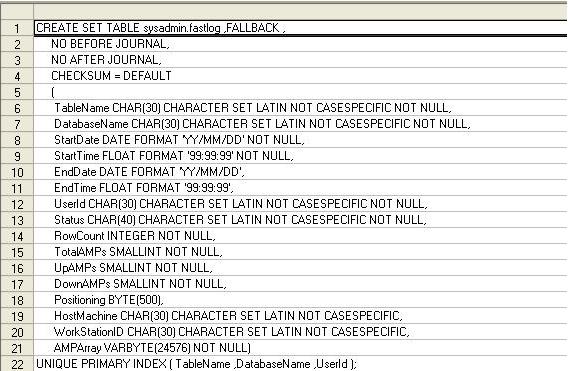
EMPTY TABLE – Fastload needs the table to be empty before inserting rows into that table. It does not care how this is implemented but it requires empty tables without any prior records. If the table is not empty then Fastload will pause and show the error.
TWO ERROR TABLES – Fastload require two error tables to catch any error which occurs during the execution of the Fastload. It create the error tables itself. Each error tables record error of specific type.
The first error table record any translation or constraint violation error. For e.g. if a row has data which does not match with the data type of its particular column then this row will be captured by error table 1. Insertion of CHAR data in INTEGER data type column.
The second error table captured any error which is related to duplication of values for Unique Primary Indexes (UPI). Fastload will capture only one occurrence of the value and store the duplicate occurrence in the second error table. However if the entire row is duplicated then Fastload count it but does not store the row.
These tables are analyzed later for error handling.
Data Conversion Capabilities
Fastload also allow the data conversion on the column value before inserting it into target table. Following are the conversion allowed by Fastload.
- Numeric-to-numeric (for example integer-to-decimal)
- Character-to-numeric
- Character-to-date
- Date-to-character
TIP– Only one conversion are allowed per column by Fastload.
To know more about Fastload check the below mentioned links –
Fastload Part 2>>




27 comments
1 ping
Skip to comment form
88vinzon makes the registration simple. I like their customer service too! Check it out 88vinzon.
cx777, aight, that’s a solid place to land. No complaints here. Pop over to cx777
Okay, hear me out, I found selcuksportshdlink when I couldn’t find the match *anywhere* else. It worked! Not the best quality, but I saw the goals live, so, yeah. selcuksportshdlink, definitely kept them in mind for emergencies.
I am new to Teradata, can you provide me study material to my email id: ksank2@gmail.com
Thank you
Hi If you have study material please send me.
Please send me too : gbrij1994@gmail.com
Hi I am new to teradata..Can you please provide the study material to my mail Id
its : pkpreetikamat@gmail.com.
Appreciate your time and help.
Excellent site you have got here.. It’s difficult to find good quality writing like yours these days.
I really appreciate people like you! Take care!!
Author
thanks for kind words
very soon… and today is 7th august 2014 😀
Author
lol 🙂 you got me
can you pls post the remaing utilities…………
I have TD SQL Assistant 3.11…trying to get to FASTLOAD utility…how do I get there to be able to use it?
Author
you cannot use FASTLOAD utility through SQL assistant.
invoke FASTLOAD through command prompt of windows or Unix
It is better you keep the advertisements before the comments and let not clog the contents of website.
This Table information is helpful
Thanks a lot for the basics 🙂
Thanks
could you pls explan about ad hoc query exactly? how to handle ad hoc queris ?
Thanks in Advance
Hi Admin,
This site is really awesome. Thanks a lot for the info.
Hi Admin,
Nice article. If we are using data conversion won’t we miss any data or in what scenario we need to use the data conversion option in fast load? I have created an outfile (Source) with data but need to load to target table. How can i use this data conversion?
Pls upload Mload also i need it
Really nice explanation …
Nice explanation……Please provide other Utilities like Multiload, Bteq, TPT etc.. at the earliest… I have been waiting for them since a long time in your website.
Thnks,
Aditya
This is really helpful guide and the site is really helpful, as being a software engineer I understand how painful is this when you don’t get proper information about the thing you are looking for desprately, and this site has resolved my pain of looking and searching over internet, so from now on wards no need to search, this is my favourite site.. 🙂
could you please provide the information about the all utilities .
thanks in advance
Author
very soon …
[…] Post From Teradata – Google Blog Search: teradata fastload, fastload, teradata utilities, fastload error tables, fastload restart, […]