
Teradata is designed in such a fashion, to reduce the DBA’s administrative functions when it comes to space management. Space is configured in the following ways in Teradata system –
1) PERMANENT SPACE
2) SPOOL SPACE
3) TEMPORARY SPACE
1) PERMANENT SPACE – Permanent space is where the objects (i.e. – databases, users, tables) are created and stored. PERM space is distributed evenly across all the AMPs. Equal distribution is necessary, because then there is a high percentage that the objects will be shared across all the AMPs, and at the time of data retrieval all AMPs will work parallel to fetch the data.
Unlike other relational databases the Teradata database does not physically defined the PERM space at the time of object creation, instead of that it defines the upper limit for the PERM space and then PERM space is used dynamically by the objects.
E.g. if a database is defined as the 500 GB PERM space and actual size of database is 300 GB only, then the remaining 200 GB will be used as SPOOL space, there is no need of holding the 200 GB when it is not required by the database. But when database required more space then this 200 GB will be released from the SPOOL space and given back to database. This mechanism ensures enough memory to execute all processes in the Teradata system.
2) SPOOL SPACE – Spool space is the amount of space on the system that has not been allocated. The primary reason for the SPOOL space is to store intermediate results or queries that are being processed in Teradata. For example, when executing conditional query all the qualifying rows which satisfies the given condition will be store in the SPOOL space for further processing by the query. Any PERM space currently unassigned is available as a SPOOL space.
Defining a SPOOL space limit is not required when Users and Databases are created. But it is highly recommended to define the upper limit of SPOOL space for any object (i.e. users, database, tables) which you create. Because in case there is no upper limit define for SPOOL space for the object then the processing query for that object might consume all the space in the system and cause “runaway transaction”.
one of the difference between the PERM space and the SPOOL space is that –
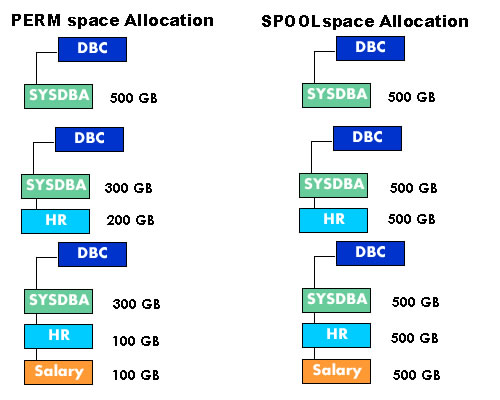
In PERM space if we create a CHILD database from the PARENT database then the amount of PERM space for that CHILD database is subtracted from the PARENT PERM space.
For example a database SYSDBA is allotted 500 GB of PERM space. Now if we create another CHILD database, say HR, from SYSDBA , and allot 200 GB of PERM space to HR database, then this 200 GB will be subtracted from the PARENT database SYSDBA. Similarly if we define another CHILD database SALARY from HR and allot 100 GB PERM space to it, then this 100 GB will be deducted from HR database.
While the SPOOL space limit for a CHILD database is not subtracted from its immediate PARENT, but the CHILD database SPOOL space is as large as its immediate PARENT.
In spool space allocation the CHILD database HR and SALARY has the same amount of SPOOL space as there PARENT database SYSDBA has.
To define PERM space and SPOOL space on a database we required below mentioned query –
CREATAE DATABASE teradatatech AS PERM = 10000000, SPOOL =20000000
3) TEMP SPACE – The amount of space used for Global Temporary Tables is known as TEMP space. These results remain available to the user until the session is terminated. Tables created in TEMP space will survive a restart. Permanent space not being used for tables is available for TEMP space.
If you are planning to appear for Teradata Certification Exams then have a look on the sample question set for first exam of TD Certification i.e. TD BASICS (TEO-121) >>




44 comments
Skip to comment form
Any way to estimate the perm size needed when importing a database from a file? Thanks!
Hi Admin
Teradata has shared shared nothing architecture which means each AMP will not share it’s virtual disk with any other AMP. But while protection that AMP’s information will be there in other AMP’s as a back up.I n this case AMP’s information is there in other AMP’s.So how this is happening. I mean here than it violates the concept of shared nothing architecture.Can you please provide explanation & clarification.
can anyone explain space occupied by views ?
Are views always created on the go and are flushed after their views ? or does they occupy some space ?
I am sure permanent space is not occupied by views,
Please comment 🙂
Thanks.
Author
views occupied spool space, as it is materialised during run time which is possible only by using spool space. Teradata doesn’t have materialized views as in Oracle instead of that it has Join Index.
Can you explain what the rational is behind having the child spool database the same size as the parent database? Curious as to why Teradata designed this way and it’s advantages.
Author
SPOOL space is the amount of unused space which is not used by any objects in teradata. Basically it is used for doing all sort of intermediate calculations for your query. Idea behind having the same SPOOL space as parent DB is, so that child DB get more amount of SPOOL space to work upon (equal to parent db) and it should not depend on hierarchy of DB.
Author
spool space is the amount of unused space available in teradata system which can be used to perform intermediate calculations. This space is volatile in nature and will be purged itself when session disconnect. So Teradata gives advantage to all child database to make use of maximum amount of spool space (which is available in system) for intermediate calculations. This way it ensures that there is enough spool space for all downstream databases.
I am new to Teradata, but I think View does not require phusical space.
How to delete duplicate records in table with out using any table.
Author
Hi All,
We have started a new special online teradata training batch for developers and DBA profile. For those who are interested to learn teradata can register in this batch. Fees is quite less when you compare it with other batches and biggest advantage is that its a instructor led training batch so you can ask any doubt in the training itself. Also we’ll be covering latest version of Teradata i.e. Teradata 14.10
Please check following link for more details about this batch –
http://www.onlineteradatatraining.com/?page_id=96
Limited Seats. So try to register ASAP.
What collect stats do?
Author
http://www.teradatatech.com/?p=611
good articles and easy to understand thanks a lot for ur web site and helping newbies to understand
Author
thanks 🙂
Hi Admin,
Do we have any query which will give the base tables of the views in teradata???
Author
you can always query dbc.tables for this
however quick look for a base table –
show sel * from
I am a used and not an admin for Teradata. How can I check how much spool space has been assigned to me?
Thanks a lot admin for an wonderful article. The posts are so interesting to read.
Luckily i gone thorough this site. Few more post i have to go through will provide my thoughts once i am done 🙂
Author
thanks
waiting for your thoughts 🙂
Hi Yuo are great ..great ..no more words to say
Becaus matter is very short but meaning is very depth like dimond.
1 Question to Admin:
There are 3 users created under database which has PERM space 50 GB. Each user is allocated 5 GB PERM space & 20 GB Spool space.
Now, the PERM Space left in database- 35 GB.
I’ve created the another user for whom i allocated 20 GB PERM space.
Now, the PERM Space left in database- 15 GB ==> UNUSED space.
Even though i allocated 20 GB spool space to each user, if i submit a sql query which takes more than 15 GB should be aborted since the unused space is only 15 GB ?? Am i missing out some thing here?
Author
Hi,
All your intermediate calculation ( e.g. redistribution, sorting, aggregation etc.) will take place in SPOOL space. Now as per example given by you if your system has only 15 GB of free SPOOL and somehow your query require more than 15 GB then definitely it will fail for NO MORE SPOOL SPACE. It doesn’t matter how much SPOOL you defined for the user, if the actual unused space is less than the required space of the query than for sure query will fail.
Also the SPOOL we defined for the user is the MAXIMUM SPOOL that can be used by user.
just for example as in your case if you defined 20 GB SPOOL space, and somehow your query wants more than 20 GB then again it will fail for NO MORE SPOOL SPACE, even if unused space is more than 20 GB.
i Hope i clear your doubt on this. 🙂
Thank you very much! What if there are 2 users are running 2 different queries each is expected to take more than 15 GB while PERM space (unused) left at system is only 20 GB.? One query has to be aborted.. right?
Author
correct … if both the queries are running on the same priority then depending on the consumption of SPOOL space , any one query can be aborted by TD.
Hi admin,
First of all thank you so much for this great article. 🙂
Please correct me here if I am wrong.Here if the SQL query which takes more than 15 GB space then it will use the 15 GB available Perm space of the database and rest space it will take from that 20 GB spool space of that particular user..Pls do reply.
Hi,
I need to install any evaluation version of teradata and then do a small R&D.
we are planning to migrate from oracle to TD.
can you please help me getting any evaluation version please?
Regards,
Niladri Das
+919836255583
Hi, i am a tester, i have a question maybe not related to this article. When i create a table in Teradata with just 1 column and drop it without inserting records in it, after successful deletion of table, it say, 14 rows processed however there is no record in the table. Can you tell me why memory space of 14 rows is occupied.
Author
Hi Sanjay …. this is very good question. I’ll try my best to answer it.
When you create the table in teradata it will be treated as an object. All the tables and users are treated as objects in teradata system. Now when we create a new object, there are several system tables like DBC.TABLES etc, which make an entry for this new object. So when you drop this object you see that 14 rows deleted, these 14 rows are nothing but the different entries in the system tables for this new object. No matter how big or small table is, or how many records it hold, on dropping the table it will simply delete all the entries for that table in different system tables. That is why you always get the result as 14 rows processed (deleted).
Hope this answer your question 🙂
if anybody has some better explanation then please feel free to add it here 🙂
I think i got the answer, Thanks Admin 🙂
Author
🙂
Author
hi Guys
check for the new set of TD Basic Sample Questions available on my site –
http://www.teradatatech.com/?p=325
6) In real time project how many tables we will have ?(Approximately)
7)In real time project how many fact tables we will have?
8)In real time project how much size will be for flat files?
9)In real time project what is project size?
Hi am very thank full to u for guidance,
I have a small questions?
1)What is fact table and what it containing?
2)Real time what are the strategies mostly we will use?
3)As a developer what are the rules we have?(On daily basis)
4)Which schema we follow in real time for our project?
5)What is the procedure we follow to log in Teradata day to day?
Please help me out!
Its good explanation for beginners and as well as you can provide the DBA part also,
That would more apprecited.
Thanks..
Author
hi Abbas
thanks for your comment 🙂
I purposely tried to make this article as simple as i can, so that any newbie can also understand space allocation concept of teradata.
but thanks for your advice, i ‘ll try to make a new advanced article on space management very soon 🙂
hi,
other good article is datatypes of teradata if you provide same then beginner can come out from confusion.
Author
hi abbas2
thanks for the suggestion …… will look forward to it 🙂