
Before you start with SI, well I must say that as a prerequisite you must first read about the Primary index in Teradata.
So after knowing about Primary index the point here is that when we already have UPI and NUPI then what’s the use of this Secondary Index?
Well the best possible answer for this question is that – Secondary Indexes provide an alternate path to the data, and should be used on queries that run many times.
Teradata runs extremely well without secondary indexes, but since secondary indexes use up space and overhead, they should only be used on “KNOWN QUERIES” or queries that are run over and over again. Once you know the data warehouse, environment you can create secondary indexes to enhance its performance.
Syntax of creating Secondary Index
Syntax of UNIQUE SI:
CREATE UNIQUE INDEX (Column/Columns) ON <dbname>.<tablename >;
Syntax of NON-UNIQUE SI:
CREATE INDEX (Column/Columns) ON <dbname>.<tablename >;
Note – SI can be created even after table is populated with data. Unlike PI which is created only at the time of creation of table. You can create and drop SI at any time.
Whenever you create SI on the table, Teradata will create a subtable on all AMP. This subtable contains three columns given below –
- Secondary Index Value
- Secondary Index Row ID (this is the hashed value of SI value)
- Base table Row ID (this is the actual base row id )
Will see the use of all these values later in this post.
USI Subtable Example
When we defined a UNIQUE SI on the table, then Teradata will immediately create a USI subtable in each AMP for that particular table.
Remember creation of subtable requires PERM space, so always be wise to choose your SI. Normally the best SI is that column or columns which is mostly used in the WHERE clause.
Now I’ll explain in-depth architecture of creation of subtable and retrieval of SI for better understanding of the concept.
Please look into the image below –
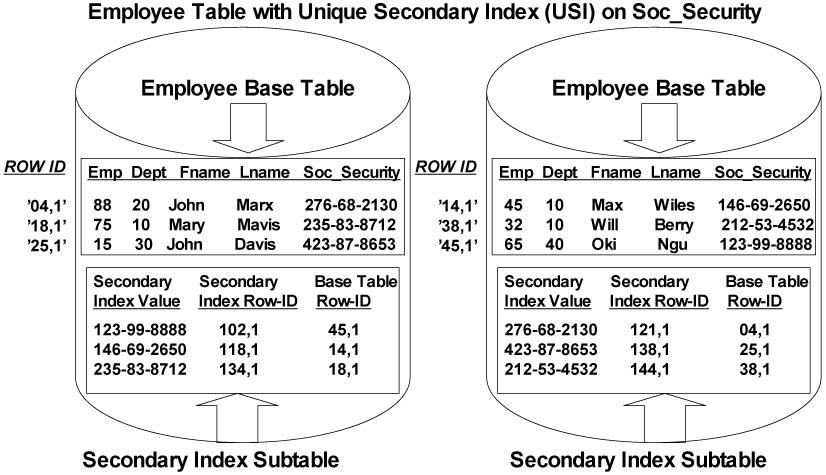
Suppose we have an Employee table (base table) having attributes Emp, Dept Fname, Lname and Soc_security. We defined USI on the column Soc_Security.
You can see the SI subtable created on each AMP which holds information about the SI column and corresponding Base row id (Base Table Row-ID), which is the ROW ID of the actual Employee table. The steps involve to load this subtable is as follows –
1) Teradata will first create the subtable on all AMP.
2) After that it hashes the value of this USI column (Soc_Security) and based on that hashed value it check the hash map for the AMP number which will hold this USI value in its subtable.
3) After getting the respective AMP number, the SI value along with the two more attributes (secondary index row id and base table row id) will be stored in the subtable of that AMP.
In this way we populate our USI subtable on each AMP. As the SI columns is UNIQUE there is no duplication of SI values in any subtable, means each row in the subtable is unique and will fetch only one row when we make a query on that SI column.
Note – As it is clear now that defining SI will require the creation of subtable, so we should be aware that SI requires space cost factor on our Teradata system.
Teradata retrieval of USI query.
Suppose on the above example we make a query –
Select * from Employee_table where Soc_Security = ‘123-99-8888’;
When a TD optimizer finds USI in where clause it knows that it’s a 2 AMP operation and also only one row will be returned. So the step its perform for retrieval is as follows –
1) It will hash the value of SI (‘123-99-8888’), by hashing algorithm and found the hash value for it.
2) Now it checks this hash value in the hash map and gets the AMP number from it. We know that this AMP stores this SI value.
3) Now it will go to the Employee subtable of that AMP and retrieve the Base row id which is stored for that hash value.
4) This Base row id will be sent back to optimizer by BYNET.
5) Now optimizer sent back this ROW ID again and fetch the resultant row from the Base table for which Soc_Security = ‘123-99-8888’ .
As we have seen that Teradata system requires 2 AMP to reach the answer row that’s why we called USI operation as the 2 AMP operations. Even if SI row resides in the same AMP in which Base row reside , still after getting Base row id from the subtable it will sent back to optimizer so that it start search again based on that Base row id. So it’s always called as the 2 amp operation.
NUSI Subtable Example
When we defined a NUSI on the table then Teradata will build the subtable on each AMP in the same fashion as that in USI. The only difference in this subtable creation is that, instead of building subtable on each AMP it will be build on AMP local which means that each AMP will build the subtable in it to points it own base rows. In other words each NUSI subtable will reflect and points to the those base rows only which it owns.
Please look into the image below –
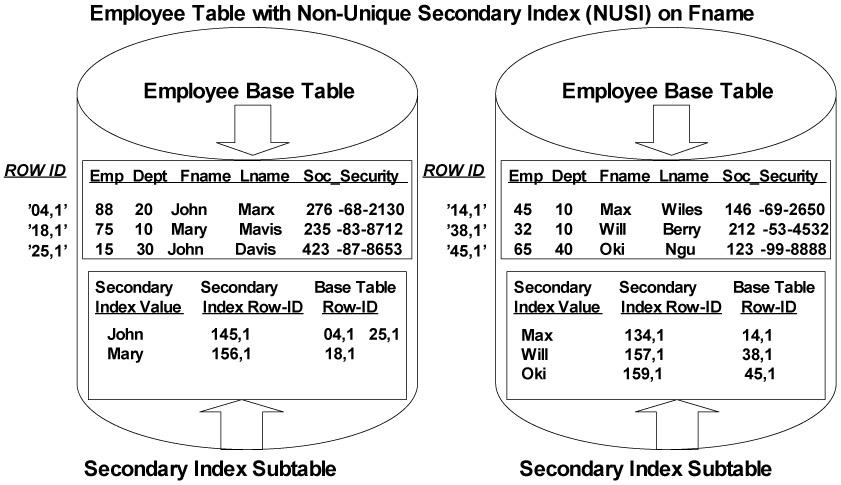
Suppose we have an Employee table (base table) on which we defined NUSI on the column Fname.
1) Now Teradata will first create the subtable on all AMP.
2) Each AMP will hold the secondary index values for their rows in the base table only. In our example, each AMP holds the Fname column for all employee rows in the base table on their AMP (AMP local).
3) Each AMP Local Fname will have the Base Table Row-ID (pointer) so the AMP can retrieve it quickly if needed. If an AMP contains duplicate first names, only one subtable row for that name is built with multiple Base Row-IDs. See the example above for the Fname = ‘John’ , the subtable holds multiple base row id for this value.
Teradata retrieval of NUSI query.
Suppose on the above example we make a query –
Select * from Employee_table where Fname = ‘John’;
When an NUSI (Fname) is used in the WHERE clause of an SQL statement, the PE Optimizer recognizes the Non-Unique Secondary Index. It will perform an all AMP operation to look into the subtable for the requested value. So the step its perform for retrieval is as follows –
1) It will hash the value of NUSI (‘John’), by hashing algorithm and found the hash value for it.
2) Now it will instruct all AMP to look for this hash value in its Employee subtable. Note unlike USI there is no looking into hash map because each subtable in the AMP contains rows from its own base rows only. So this look up on hash value will be performed on all AMP subtable.
3) Any AMP which doesn’t have this hash value will not participate anymore in the operation.
4) When the hash value found the corresponding Base row id will be fetched from the subtable and send to optimizer for actual retrieval of rows.
The point to note here is that NUSI operation is not similar to FTS (full table scan).
Suppose we don’t have Fname as the NUSI and we make the query on Fname in WHERE clause. In this case first of all Fname from the Employee table is redistributed in SPOOL space and then we match our value given in the where clause from the rows in SPOOL.
While in our case where Fname is defined as NUSI, TD optimizer already knows that this column is NUSI and its already distributed by its value in subtable in each AMP. So it will not go for redistribution step instead of that it will directly match the value for it in each subtables.
The PE will decide if a NUSI is strongly selective and worth using over a Full Table Scan. So it’s advisable to always do COLLECT STATS on NUSI index. You can check the Explain function to see if a NUSI is being utilized or if bitmapping (FTS) is taking place.
Secondary Index Summary
1) You can have up to 32 secondary indexes for a table.
2) Secondary Indexes provide an alternate path to the data.
3) The two types of secondary indexes are USI and NUSI.
4) Every secondary index defined causes each AMP to create a subtable.
5) USI subtables are hash distributed.
6) NUSI subtables are AMP local.
7) USI queries are Two-AMP operations.
8) NUSI queries are All-AMP operations, but not Full Table Scans.
9) Always Collect Statistics on all NUSI indexes.
Any suggestions, corrections or enhancements to the post are most welcome 🙂




100 comments
1 ping
Skip to comment form
Roulette’s randomness is fascinating – the math behind it is truly elegant! Seeing platforms like jl boss games app casino prioritize security & smooth logins (KYC is key!) shows they understand player needs too. Great analysis!
Yo, tai188bet looks promising. They’ve got a solid selection of games and the site’s not clunky like others I’ve tried. Worth a look if you’re into online betting. Check out tai188bet and let me know what you think!
If you ask me, Gold99Casino has a solid reputation. Been hearing good things and decided to try it myself. Not disappointed! gold99casino
The jl33login process was super easy, which is always a win. No complicated hoops to jump through, just straight to the games. Highly recommend based on my user experience. jl33login
Thanks for the detailed post..
Hi Team,
I understood the concept of Secondry index.
Can any one tell how can i know whether NUSI is utilised by optimiser or not.
I tried to get it through explain plan with and without NUSI on a particulat column.
But everytime i got same explanation in explain plan.
Anyone has clarification on it.
Thanks
Hi Team,
I understood the concept of Secondary index.
Can any one tell how can i know whether NUSI is utilized by optimizer or not.
I tried to get it through explain plan with and without NUSI on a particular column.
But every time i got same explanation in explain plan.
Anyone has clarification on it.
Thanks
Hi,
Explanation is good but i had a doubt.When we create a Secondary index on table,it stores baser ow id,index row id and index value but my doubt here is how the secondary index value know the base row id.
Can anyone pls provide some light on this.
It will take the base rowid from base table ’employee’ table in the above example.
BASE TABLE ROWID is the ROWID of primary index rowhash value+ sequence no.
The original table is the base table.sub table is the secondrary index table.
for example original table or base table in the above example is employee table.
Subtable in the above example is secondary index table.
In the above example in the employee table if you see the 1st row id ‘04,1’,this row id is the Base table row id column in subtable.
Hope this clears your doubt,
Hope this clears your doubt,
I have got clear understanding of SI. Thanks a lot. Very much helpful for me.
How USI subtable will have base table row id, where will it get it??
” After getting the respective AMP number, the SI value along with the two more attributes (secondary index row id and base table row id) will be stored in the subtable of that AMP” — from this context
BASE TABLE ROWID is the ROWID of primary index rowhash value+ sequence no.
The original table is the base table.sub table is the secondrary index table.
for example original table or base table in the above example is employee table.
Subtable in the above example is secondary index table.
In the above example in the employee table if you see the 1st row id ‘04,1’,this row id is the Base table row id column in subtable.
Hope this clears your doubt,
Hi Admin,
I have a doubt. when 2 columns are considered to be a part of a Secondary Index, Does it create 2 sub tables (One for each individual column ) or just a single sub table containing both values.
Author
It will create only 1 subtable. Hashing algorithm will work on one value only, that may come from one column or combined values from different column.
Hi Admin ,
Can you let me know why does PI retrieval use row hash and SI retrieval use the entire row id.
Regards
vandan
Secondary Index (NUSI) stores values based on entire row id (which is a combination of row hash and uniqueness) because it allows duplicates and in TD each record is stored in the Amp locally based on the row-hash number but when there is duplication a unique id is added to the row-hash to make it unique so that the PE doesn’t get confused. whereas in case of PI since there is no duplication allowed, each record has unique row hash anyway so it uses the row hash
Awesome way of explanation..i understood it by reading the full article just once. Thanks Nitin, for helping us 🙂
Hi Admin,
Could you please tell me. No. of AMP operations for
UPI, NUPI, USI, NUSI.??
Thanks in advance.
Hi Jayant,
Till the time admin replies below is the number of AMP operations as requested :
UPI : 1 AMP
NUPI : 1 AMP
USI : 2 AMP
NUSI : All AMP.
excellent work
nice work !!!!!
hi admin,
i dont understand what is the use of Secondary index row id in subtable can you explain it with example.
Thanks,
u need secondary index rowid to point to the Secondary index column value in subtable.
For example u created secondary index on Fname in above example.
lets say u dont have secondary index on column Fname, so when u search for john since its not having any index the PE has to search for the ‘john’ in all the amps, so it will be ‘all amp’ and ‘full table scan’ ,which is time consuming and resources consuming.
Lets say u have created secondary index on Fname, so when u search for ‘john’ the PE generates hashing value (secondary index row id)and it will know where the john is residing,so with the help of secondary index row id it will now directly point to ‘john’ in secondary index subtable.
ABsolutely helpful and superbly explained.great job !!!
You wiped out all my confusion on SI ….
Perfect explanation!! Well Simplified!!
Splendid article.Explained things in a very Lucid manner..
Very good understanding of Teradata SI ,,,Thank
Thank you good explanation it is very easy for the freshers to understand the concept in a better way
It’s really very helpful.The fundamental things in teradata will be cleared by reading this articles.Thanks a lot and keep posting such nice articles..:)
Author
Hi All,
We have started a new special online teradata training batch for developers and DBA profile. For those who are interested to learn teradata can register in this batch. Fees is quite less when you compare it with other batches and biggest advantage is that its a instructor led training batch so you can ask any doubt in the training itself. Also we’ll be covering latest version of Teradata i.e. Teradata 14.10
Please check following link for more details about this batch –
http://www.onlineteradatatraining.com/?page_id=96
Limited Seats. So try to register ASAP.
Hello Admin..
I have always confused of how SI worked.. Nice and simple pictorial explaination has helped in the basic understanding of the working of SI.
Thank you for the post
Nice Article with detailed explanation
Nice Article
This website is absolutely marvelous. It presents the concept so beautifully that all the wrong notions in the mind are dispelled and the supporting examples ensure that the concept is not forgotten for a long time.
Author
Thanks Anurag 🙂
Hi.
the advantage of having a NUSI instead of proper statistics is only that the hasing of the values is allready done instead of on the fly in a query. Right?
i am doubting when a NUSI is better than statistics.
regards, Marco
wow..gr8 stuff
Excellent explanation!
I have a question about USI, You said its always 2 AMP operations. But if we have 4 amps in an organization, do we have to say it as 4 amps operation. My understanding is the table will be divided based on PPI on 4 amps and we will have 4 subtables. Correct my understanding.
thanks
Kumar
Author
USI will always be 2 AMP operation, no matter how many AMPS you have in teradata.
1 AMP operation is required to fetch the base row id from subtable and 2 AMP operation is required to fetch the actual base row.
Nice work Nitin … You have beautifully explained the core concepts, not confusing with advanced details… great
Author
Thanks…
Hi Niteen,
Your posts are awesome and I have a small question.
In the example you had given for NUSI, its a one AMP operation only but at the end you were saying NUSI is all AMP operation. I’m little confused, can you please explain it once.
Author
Hi Srini,
In which example you are seeing NUSI is one AMP operation ? Please clarify on it.
NUSI is always ALL AMP operation.
Hi Niteen,
SELECT * FROM Employee Table where Fname = ‘John’.
In the above query only one AMP is involved to get the result.
Initially I thought its an one AMP operation. But I have realised later on that after searching ALL AMP’s only it comes to know that ‘John’ as first name records are there in only one AMP. So are we calling it as ALL AMP operation, am I correct?
Please advise if I’m into wrong understanding.
Thanks,
Nitin
Author
Yes,
We are calling it as ALL AMP operation.
wow…nice explanation with proper examples..:)
Thanks for a clear explanation by using such simple terms.
nicely explained 🙂
good n awesome article
Excellent Article. Basic concepts are been explained in very easy to understand language.
Can you let me know teh names of some beginner books on TD .
Thanks,
Thank u very much for your details explanation
awesome article thank u lot
Nice Article !!!!!!!!
Author
thanks 🙂
I understood the concept of PI and SI by going thorugh your post just ones.
Where as I was struggling to understand this for past few days even after going through lot’s of material and blogs.
Thank you Nitin for this beautiful explanation and hats off to your hardwork
Regards,
Chinmay Athavale
Author
thanks Chinmay 🙂
Hi Admin,
In your NUSI explaination,what will be hashed value of “John” in AMP local subtable,if
in the 2nd AMP we have record like
70,40,John,Porter,243-123-127(atrribute sequence is kept unaltered)?
Will that be 145(like it has appeared in 1st AMP subtable)?
Hi,
Could you please let me know the use of SI row_id.
Thanks.
Whenever we create a secondary index teradata will create subtable on all AMPs.This subtable contains-
1.SI value
2.SI row id
3.Base table row id
In case of USI after getting the AMP no. from the hash value it goes to employee subtable of that AMP and retrieves base row id why so when subtable stores SI value as stated above what is the need of retrieving base row id from subtable and sending back this base row id to optimizer which fetches SI value from base table?
Author
i didnt understand your questions 🙁
sel * from emp where last_name = ‘kumar’;
in this SI is last_name and result set will be all columns from table emp whose last_name =’kumar’, so it has to fetch the base row id to get all column values.
whats the confusion here ?
Each and every point is useful ….Thanks for sharing …
You really have the boon of explaining complex things in easy words..
appriciate ur effort..
Author
Thanks for appreciation 🙂
Very nice article.. Thanks..
Author
Thanks 🙂
Really very nice post.Can you please share some concepts on procedure,macros and functions.
Author
i guess those are the topics which is not in scope of this blog 🙂
It’s awesome,
I dont know that how much time you required to learn this ! But surely you have in depth experience in TERADATA .
Please tell us about yourself,your experiences.
You are superb!
Good work.. It is very easy to understand.. Can you please post the topics on Locks and all 5 types of Utilities.
I have read about secondary Index. that is really good to understand. However, I have one question on secondary index. I am posting this, hope I will get correct ans as I am not able to find the correct ans even after reading his topic on the same website.
What is a reason to use a USI over a NUSI when creating a table?
a.They ensure data uniqueness.
b.They are a oneAMP operation.
c.They are needed for journaling.
d.They are supported by the batch load utilities.
Answer :C (I found this ans) but sure about it.
Awesome article…. good job admin really finding easy understanding the TD basics….
Excellent article. Very well explained and the example is super.
Hi Nitin
Its an awesome article.Please provide more information about Locks used in Teradata with an example.
Thanks
madhuri
Author
Thanks
Will try to post on locks as well
Hi Admin,
I am clear about the USI subtables which are hash distributed. But litle confused with the NUSI subtables which are AMP local. It is mentioned that, in the case of NUSI, the subtable in each AMP will be pointing to those base rows, only which they own.
So is the USI subtable created on each AMP, will be pointing to the entire rows in the base table? If the answer is: no, it will be decided using the hash algorithm, then how the NUSI and USI subtable differ?
Author
in case of USI, optimizer hashes the USI column and then look into HASH MAP to get the actual AMP where the row reside.
while in NUSI, optimizer hashes the NUSI column but won’t refer the HASH MAP instead of that it instructs all the AMP to check in there respective NUSI sub table to look for that value.
data retrieval is the major difference between USI and NUSI subtables.
nice explanatio
awesome post..
Hi admin,
The article is really good. Please answer for my questions below:
1. Can secondary index be defined on a table which dont have primary index defined? Is there any condition like SI can be defined only if PI has defined on the table?
2. Suppose NUSI has been defined on a table which has few data. 10 rows are inserting into the table later on. How the the AMP subtables include the new rows?
Author
your answers –
1) You cannot create a table without defining PI (if you are below TD14 version). Even if you won’t give PI in DDL, then Teradata itself makes the PI for the table.
2)As soon as you define NUSI, all the rows of the base table will be sorted and placed in same AMP subtable. When you are inserting 10 new rows, then first they will be processed based on PI in respective AMP and after that processed in sub tables based on SI.
For 1st Question i have one doubt.
I created one table with “NO PRIMARY INDEX”.
(CREATE TABLE A(ID INT,NAME VARCHAR(30),SAL INT) NO PRIMARY INDEX)
I inserted data into table A. and I created UNIQUE SEC.INDEX(id) on A. it was created.
Note: we can create UNIQUE SI on a table which doesn’t have PI
CORRECT ME IF IAM WRONG……….
Anyone please answer for this above post…i too got same doubt.
Author
Hi Vardhan
yes you can create USI or NUSI on the NPI (NO PRIMARY INDEX) table.
Besides SI you can also create following on NPI –
• Fallback
• Join indexes
• UNIQUE column constraints
• CHECK constraints
• PRIMARY KEY and FOREIGN KEY constraints
• Triggers
Hi Admin,
Besides SI you can also create following on NPI –
• PRIMARY KEY and FOREIGN KEY constraints
I think you mean primary key like in sql can be created on the table with NO PRIMARY INDEX.
Can I create primary index after creating USI or NUSI on table?
Hi Admin,
How the data will be stored in AMPs for tables with NO Primary Index(NPI) for prior to TD14 versions?
As i understood data is stored/inserted in tables based on the hashing algorithm on PI. In absence of PI how the data will be stored…
Thanks
Shashi
Awesome article…Easy to understand… Great work
hai sir i have a doubt in case of nusi after generation of hash-row index parser has to to send to appropiate base tables .how it can know that it has to send to that base table only with out refering to hashmap for that base table
Author
when you use NUSI in your SQL query, PE immediately identifies that this is the NUSI and it must have the subtable defined in each AMP. Now it simply hashes the value of that NUSI and it checks in ALL AMPS which contains the subtable of that base tables. As its a ALL AMP operation no need to check it in HASHMAP.
Hi,
here is my doubt ,when we use non index column in where clause all the values are redistributed in the spool and compare the value in the where clause.How it compare, using hashing or with just with column value?
Author
teradata compare the columns based on their hash value not actual value .
This is very nice article. It does explain the complex things in simpler fashion.
It does makes the concept of indexes clear. which is very helpful
Thanks a lot
Awesome article….complicated things explained in amazingly simple way….:hats off:
Great work admin . Thanks for ur efforts on doing this
article has made complex things easily understandable. 🙂
Nice information about the teradata.i appreciate your detailed explanation.
Thanks a lot.
Author
Thanks Vanni 🙂
great article.. simple to read and understand the complex architecture.. appreciate your efforts put into this.. hope to see more of these on Teradata..
Author
thanks 🙂
Author
Hi Readers,
I’ll highly appreciate if you leave your feedback as comments after reading this post 🙂
Thanks
Nitin
Nice work Nitin, information gave lot of insight and understanding.
[…] Teradata Blog Post From Teradata – Google Blog Search: Teradata runs extremely well without secondary indexes, but since secondary indexes use up space […]