
Partitioned primary index or PPI is used for physically splitting the table into a series of subtables. With the proper use of Partition primary Index we can save queries from time consuming full table scan. Instead of scanning full table, only one particular partition is accessed.
Follow the example below to get the insight of PPI –
We have an order table (ORDER_TABLE) having two columns – Order_Date and Order_Number, in which PI is defined on Order_Date. The primary Index (Order_Date) was hashed and rows were distributed to the proper AMP based on Row Hash Value then sorted by the Row ID. The distribution of rows will take place as explained in the image below –
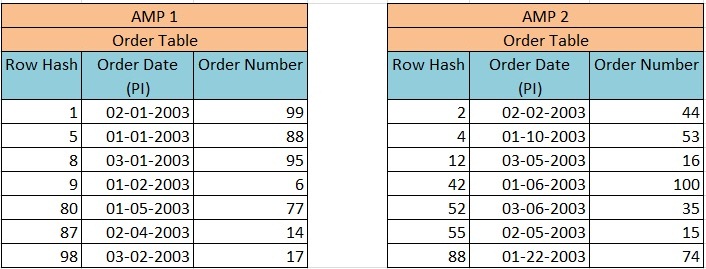
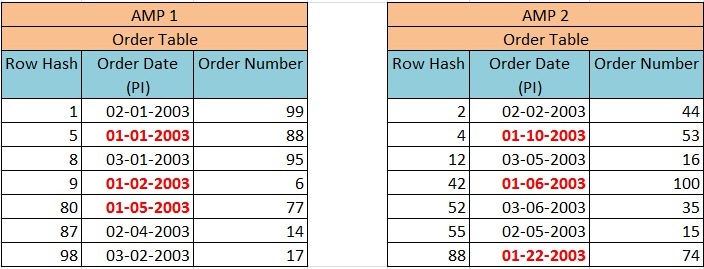
Now when we execute Query –
Select * from Order_Table where Order_Date between 1-1-2003 and 1-31-2003;
This query will result in a full table scan despite of Order_Date being PI.
Now we have defined PPI on the column Order_date. The primary Index (Order_Date) was hashed and rows were distributed to the proper AMP based on Row Hash Value then sorted by the Order_Date and not by Row ID. The distribution of rows will take place as explained in the image below –
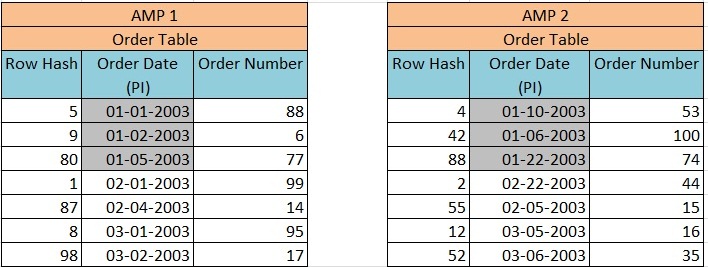
Now when we execute Query –
Select * from Order_Table where Order_Date between 1-1-2003 and 1-31-2003;
This query will not result in a full table scan because all the January orders are kept together in their partition.
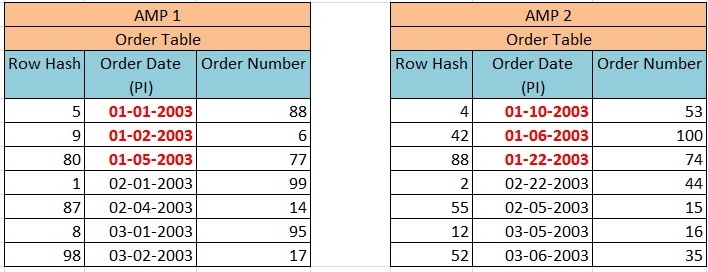
Partitions are usually defined based on Range or Case as follows.
Partition by CASE
CREATE TABLE ORDER_Table (
ORDER_ID integer NOT NULL,
CUST_ID integer NOT NULL,
ORDER_DATE date ,
ORDER_AMOUNT integer
)
PRIMARY INDEX (CUST_ID)
PARTITION BY case_n (
ORDER_AMOUNT < 10000 ,
ORDER_AMOUNT < 20000 ,
ORDER_AMOUNT < 30000,
NO CASE OR UNKNOWN ) ;
Partition by RANGE
CREATE TABLE ORDER_Table
(
ORDER_ID integer NOT NULL,
CUST_ID integer NOT NULL,
ORDER_DATE date ,
ORDER_AMOUNT integer
)
PRIMARY INDEX (CUST_ID)
PARTITION BY range_n (
ORDER_DATE BETWEEN date ‘2012-01-01’ and ‘2012-12-31’ Each interval ‘1’ Month,
NO range OR UNKNOWN ) ;
If we use NO RANGE or NO CASE – then all values not in this range will be in a single partition.
If we specify UNKNOWN, then all null values will be placed in this partition
To know about the advantage and disadvantage of PPI please go to link below –




34 comments
Skip to comment form
Hi,
The explanatin is good but need to understand how the data is been retrieved while quering on PPI?
Will it exactly query only that partition in AMP instead of having so many number of partitins in AMP?
Author
Data retrieval process remains same with the exception of an additional check on partition number. If you are using PPI column in where clause then with the help of binary search Teradata will query exact partition, but in case no PPI column is being used in where clause then it needs to scan all the rows (in respective AMP) to find the matching row. This is trade off of using PPI because all queries without PPI column face all rows scan (in single AMP).
Hope it helps !!!
Thanks..one more question what happens if i define PPI columns other than PI column in that table.How the data is being retrieved.will the performamce increase or decrease by the above method.??
Dear admin ,
thanks for share Wonderfull blog
Thanks regards
Vijay Jadoun
Thank you Sir.
What is the process to change the existing table to PPI table and will there be any change in row distribution after conversion into Partioned primary index?
Sir can you please kindly explain multiload , the way u have explained fastload?
fastload explanation was really helpful..
Regards
How many amp operation is PPI?
Author
can be any number of AMP depending on your query. but not full table scan if you are using PPI columns in where clause
Range bases query on NUSI column ALWAYS do Full Table Scan OR it may utilize index?
simply superb explanation.
Information is very clear and simple…good work admin/..all the best for your future works
will there be an impact while loading huge data into tables like performance increase/decrease
Author
yes definitely.
if data is huge and your table is defined as SET table, then teradata needs to check uniqueness of each new row inserted. Similar check is required for Unique columns, UPI and USI as well.
This is just one example where your performance can be degraded because of huge number of rows.
its useful to me
gud
Why it is called partition primary index ? if we can do PPI on any column no matter its PI or not .
I did not get this. So taking your last example. suppose cust_id is the primary index (NUPI) and you did the partitioning based on case (order_amount). Now i fire query like this:
sel * from order table where order_amount between 5000 and 15000;
what does it mean ? we are not quering on the PI (cust_id) at all ! this will result into FTS still..right.
Also, why is it called PPI if the PI is cust_id and partitioning is done on ‘order_amount’ ? Thanks 🙂
Author
if order amount is defined as PPI, then optimizer will go for dynamic partition elimination step and pick only those partition which falls into the range specified in WHERE clause. Thus it will not be a FTS operation.
Hi,
Very nice explanation. Finally understood PPI.
Thanks a lot!
How do I actually view infromation about the partitions? Info like amount of data in each partition, # of rows, date loaded, those kind of items?
Author
you can write SQL queries to achieve this result. I don’t think there is any teradata tool available for this.
Hi Admin,
if we didnt mention NO RANGE OR NO CASE or UNKNOWN, what will happen to the records not falling in the range/case?
Thanks.
Hi,
The article is really good.. 🙂
One concern,
In the example,since jan data is avilable in both the amp’s it would still require a full table scan right?
No, because each AMP processes only his own part of the table, especially only his part of the partition of the table..
Good explanation
Really superb. Very Simple explanation
Finally i undeerstood PPI.
Thanks Admin.
Good One.
good explaination.. could have explained about Each interval ‘1’ Month,
I never understood PPI but after reading ur article my doubt is clear.
I missed ur website all these days 🙁 .. Really helpful …keep posting .
Author
Hi Veera,
What do you mean by missed it ? … are you facing some server downtime for my website ?
Next time please let me know in case you are facing this issue on my site 🙂